
So, I was just doing some basic admin tasks using the vSphere Web Client, and I accidentally closed the recent tasks pane at the bottom,

that really threw me, I have never made that mistake before and it took me ages to work out how to get it back.
So if you are as dumb as me, or at least made the same mistake as I did, hopefully, this will help you out:
All you need to do is to reset the web client back to factory defaults, by clicking on the little arrow next to your login name, up in the top left of the page and select “Reset to Factory Defaults” you will have to log in again, and if you had moved the other objects around they will be reset too, but at least you get the recent tasks back

<Edit>
Thanks to Daniele Murrau who also informed me that if you want to just add the ‘Recent Tasks’ or ‘Alarms’ pane back, without performing a full ‘Reset To Factory Defaults’ you can do so by clicking on the ‘Layout Settings’ option and putting a tick back in the radio button box, shown below:
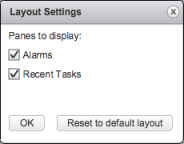
Useful if you have made other layout changes that you want to preserve as well as adding the missing pane(s) back

 Will's Blog
If you click on the link below, ‘layout settings’ , you can restore the Recent task box without resetting to factory default.
Thanks for the feedback Daniele, I have updated the post to show this
yea, you the booom
THanks that helped….
It helped
Thank you very much for sharing this, I ran into the similar problem and your post help me to fix it 🙂
thanks for the helpful blog, saved my time.
thanks a lot – you saved my day
Walter
HUGE HELP thanks bud
Thanks!
Thanks buddy, I am also baffling around the same.
thanks its very helpful
Thanks it works
Thank you.
Thank you so much!!!
Much appreciated. This same issue was driving me crazy!
Thanks it works!!
Didn’t fix it for me…
Thanks you so much.