

The Missing Link: How Model Context Protocol (MCP) is Connecting AI to Your World
Imagine hiring a brilliant expert who has read every book in the library but isn’t allowed to use the internet, check live data, or even open a spreadsheet on their computer. Their knowledge is vast but static, frozen in time. This is the reality for most Large Language Models (LLMs) today. They are incredibly capable but fundamentally disconnected from the real-time, dynamic world of enterprise data and tools.
Enter the Model Context Protocol (MCP). This open standard is rapidly emerging as the critical bridge that connects isolated AI models to the information and capabilities they need to become truly useful agents. In this article, we’ll explore what MCP is, how it solves major headaches for AI developers, and where it fits into your enterprise AI strategy.
What is the Model Context Protocol (MCP)?
At its core, the Model Context Protocol is an open-source standard designed to normalise how AI models interact with external systems. Think of it as a universal language that allows an LLM to say, “I need to look up the latest sales figures,” or “Please update this customer record,” and have a standardised way to communicate that request to a database, an API, or a software tool.
Before MCP, connecting an LLM to a new data source required building a custom integration—a brittle, time-consuming process that had to be repeated for every new tool. MCP replaces this fragmented approach with a single, unified protocol, enabling AI agents to connect to a vast ecosystem of data and tools in a plug-and-play manner.
Under the Hood: How MCP Functions
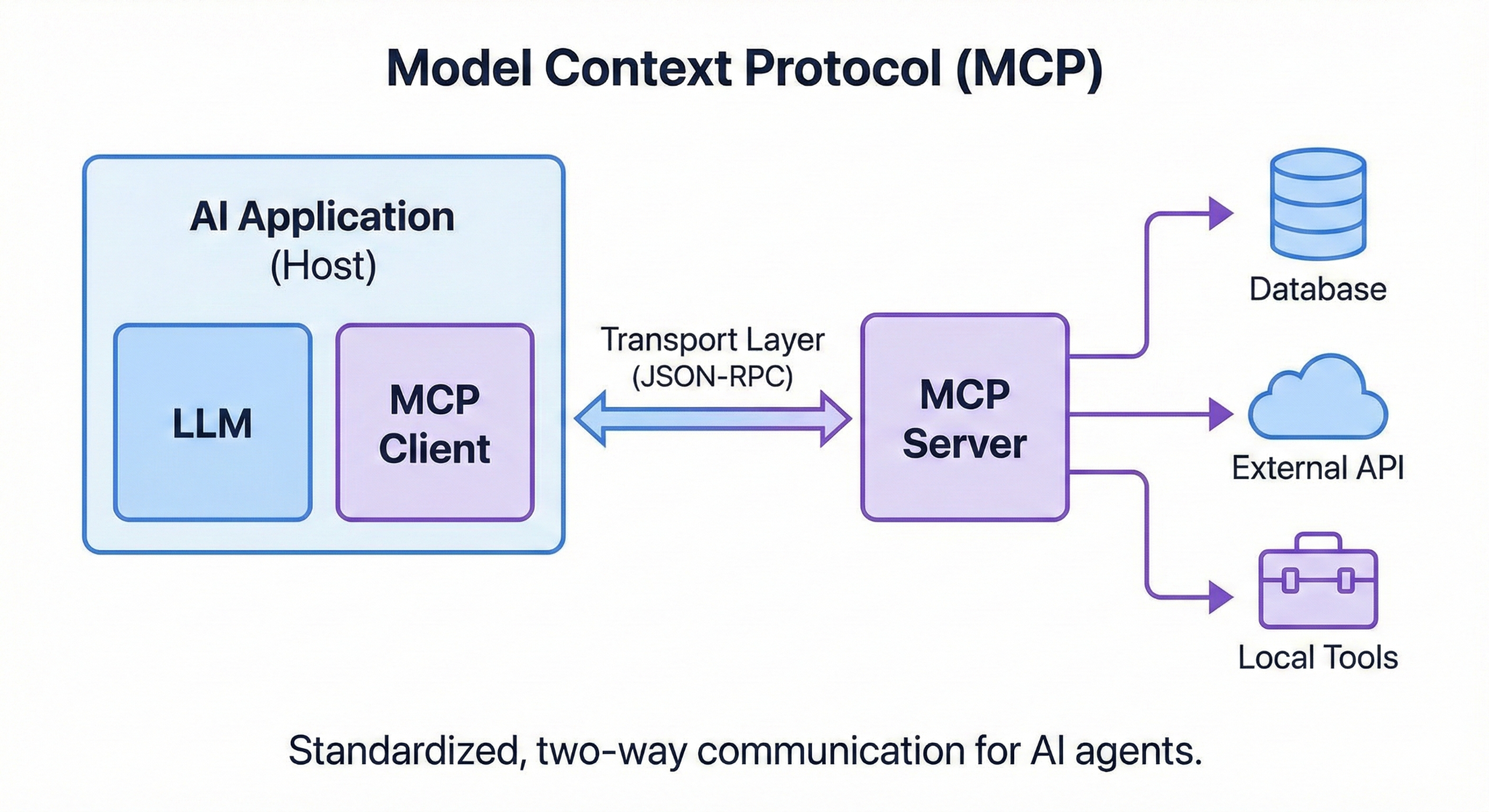
MCP operates on a client-server architecture, establishing a standardised two-way communication channel between the AI application and external resources.
- MCP Host: The AI application itself (e.g., a chatbot or an AI-powered IDE) where the LLM resides and interacts with the user.
- MCP Client: A component within the host that acts as the translator. It takes the LLM’s natural language intent and converts it into a structured MCP request.
- MCP Server: A lightweight service that sits in front of your data sources or tools. It understands MCP requests and can execute them against the backend system (e.g., running a SQL query or calling a REST API).
- Transport Layer: The communication channel (typically using JSON-RPC messages) over which the client and server exchange information.
The diagram below illustrates this elegant and modular flow.
Solving the “Smart but Disconnected” Problem
MCP directly addresses several critical challenges that have held back the deployment of truly useful enterprise AI:
- Fragmented Integration Workflows: Instead of building and maintaining dozens of custom connectors for your CRM, ERP, databases, and internal tools, you build a single MCP server for each. Any MCP-compliant AI client can then instantly interact with them.
- Reduced Hallucinations: By giving the LLM direct access to ground-truth data in your systems, you significantly reduce the chance of it making up information. The model can cite its sources, increasing trust.
- Increased AI Utility & Automation: MCP transforms an LLM from a passive knowledge retrieval system into an active agent. It can’t just tell you about a problem; it can be granted the tools to fix it, from resetting a password to reordering inventory.
- Standardised Context Handling: MCP provides a structured approach for defining and passing context. This ensures that different teams and systems are “speaking the same language” when providing information to the model, reducing errors and inconsistencies.
Navigate with Care: New Challenges Introduced by MCP
While powerful, opening up your internal systems to an AI model introduces new risks that must be managed carefully:
- Security Risks: Giving an LLM the ability to execute code or query databases is a high-stakes game. Malicious actors could try “prompt injection” attacks to trick the model into performing unauthorised actions. Robust permissions, sandboxing, and human-in-the-loop verification are essential.
- Identity and Access Management: It can be unclear whose identity the AI assumes when it takes an action. Is it acting as the user, or as a system agent? Clear identity propagation and auditing are crucial for compliance and security.
- Token Consumption & Cost: Every piece of context sent back and forth between the client and server consumes tokens. For complex workflows with large datasets, this can quickly drive up costs and increase latency.
MCP vs. The World: Alternatives Compared
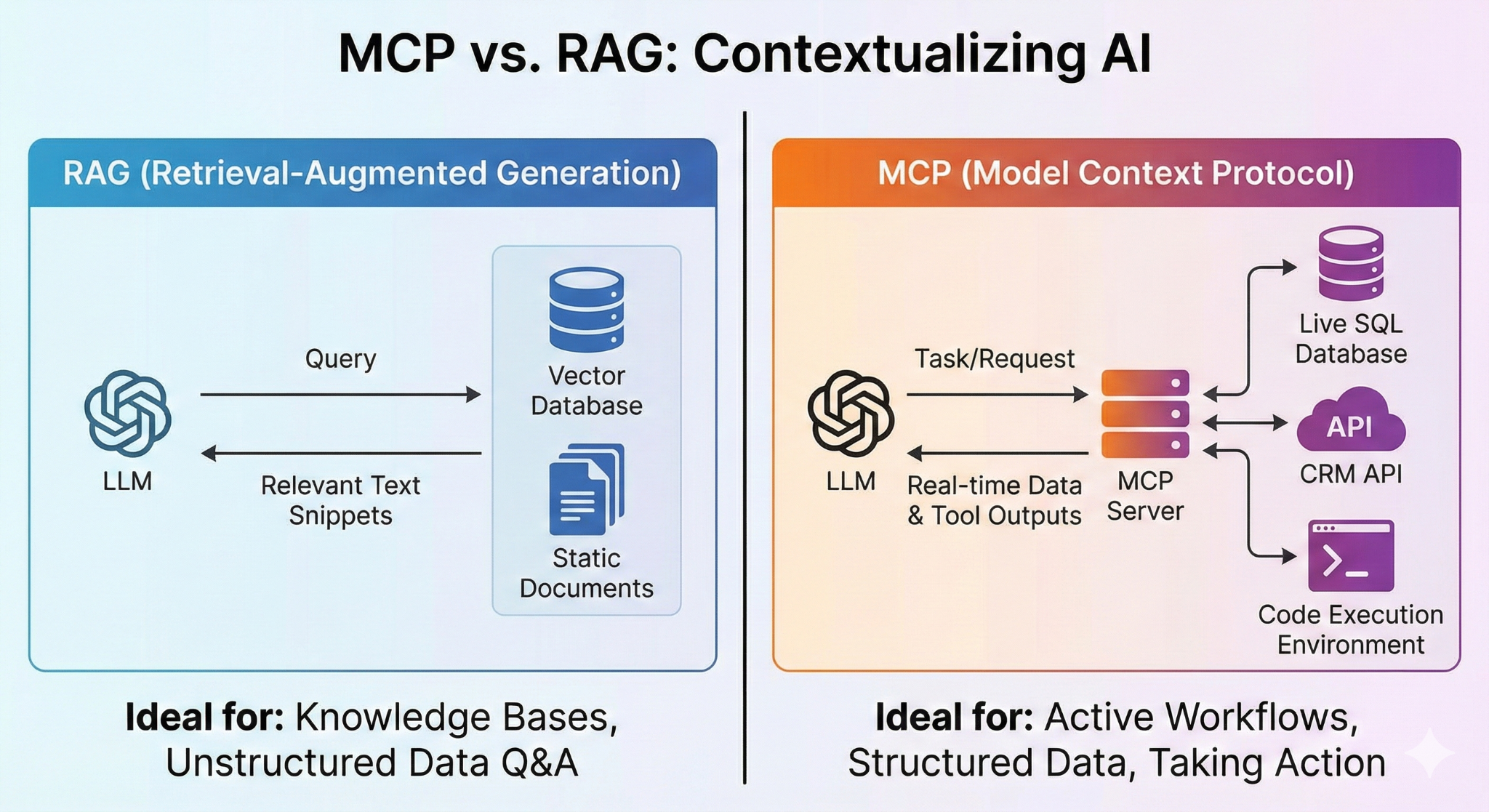
MCP is not the only way to give an LLM access to external information. It’s important to understand how it compares with other popular techniques, such as Retrieval-Augmented Generation (RAG).
RAG is primarily designed to retrieve static, unstructured data from knowledge bases (e.g., PDFs or wikis) via semantic similarity. It’s great for answering the question “What does our policy say about X?”
MCP is designed for dynamic, structured data and active tool use. It’s the right choice for tasks like “find the live status of order #12345 from the SQL database and email the customer.”
While they can be used together, they solve fundamentally different problems. The image below provides a clear comparison.
The Enterprise Verdict: When to Use MCP
MCP is a game-changer, but it’s not a one-size-fits-all solution.
It’s a great fit when:
- You need to connect AI to diverse, siloed internal systems.
- Your use case requires real-time data access and the ability to take action, not just retrieve information.
- You want to build “agentic” workflows where the AI can reason and execute multi-step tasks.
It might not be the best fit when:
- You have a very simple, stateless integration where a full protocol is overkill.
- Extreme low latency is paramount, and the protocol’s overhead could be an issue.
- Your team is not ready to manage the security risks of giving an AI agent access to internal tools.
As the ecosystem matures, MCP is poised to become the standard for building truly connected and capable AI agents. By understanding its power and its pitfalls, enterprises can unlock a new level of automation and intelligence.
[1]: What is Model Context Protocol (MCP)? A guide – Google Cloud
[2]: Specification – Model Context Protocol
[3]: What problems does Model Context Protocol (MCP) solve for AI developers? – Milvus



 Will's Blog